You can browse through the business terms available in your ecosystem using the Discover Assets module. The list of business terms facilitates mind map, and associations of a business term, all in one place.
To view the business terms list, follow these steps:
-
On the Discover Assets dashboard, click the Business Terms card, then click Browse Business Terms. A list of business terms appears.
- Use the search box to find the required business term from the list. Additionally, you can use the Propose Assets option to propose new business terms. For more information, refer to the Proposing Assets topic.
For example, in the following image, a list of 10255 business terms appears.
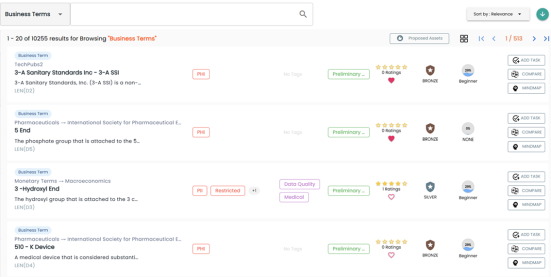
On each business term tile, you can perform the following tasks with respect to a business term:
In addition to the above tasks, on the business term list, you can click  to mark business terms as favorite.
You can also download business assets in the XLSX format. To download business assets, follow these steps:
-
In the filters pane, click Explore By Category and hover over a business asset.
The download button
 appears.
 -
Click
 .
.
The selected business asset is downloaded in the XLSX format.
Viewing Business Term
The View Business Term tab includes term details, governance responsibilities, audit history, and so on.
To access the View Business Term tab, on the business term list, click <Business_Term>.
The <Business_Term> page appears and displays asset details.
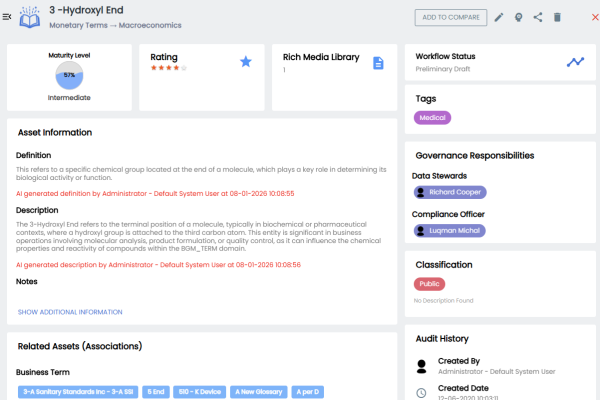
For example, the following image displays, details of the 3 - Hydroxyl End business term. This displays the asset's details, rating, data value score, maturity level, sensitive classification, tags, associations, additional properties, governance responsibilities, audit history, and more. Now, each associated asset is clickable. Clicking on any of these assets takes you to the specific asset's page.
Apart from viewing the business term details, click  to edit them in a new tab. Additionally, click
  to generate a shareable link to share business terms.
For more information on editing business terms, refer to the Managing Business Terms topic.
Editing business terms also include the following: